How deposits work
What the app and the Lock-In program do with your goal and your deposit. The app shows the rules for your goal again before you lock anything.
Lock-In is new. It runs on Solana mainnet with SKR. Each goal takes a deposit from 100 to 10,000 SKR, and the program is still upgradeable by the developer.
Types of goals
Daily steps. Set a daily step target. Lock-In reads your steps from Android Health Connect on your phone. Steps entered by hand don't count. If your phone and a watch record the same walk, it counts once.
Personal check-in. Any other daily habit. You tap Check in once you've done it. It works on your honor, and a check-in can only ever return your own deposit.
Either way, the Solana program never sees your steps or your habit. It records the days your phone reports as complete.
The calendar
- A goal starts at the next midnight in your phone's time zone, so every day is a full day. If midnight is less than 10 minutes away, it starts at the midnight after that.
- The time zone is saved when you create the goal and doesn't change if you travel. The app shows it on the goal.
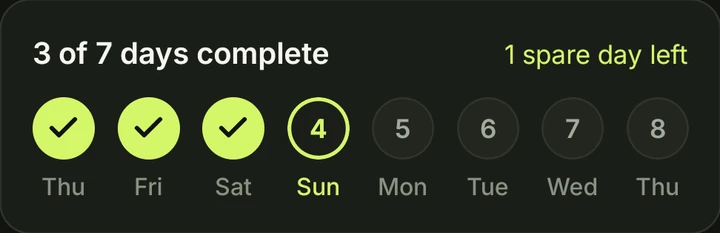
- You need N completed days within N + 1 calendar days. A 7-day goal has an 8-day window: one spare day is included, and it can be any day of the window.
- Daylight-saving changes are handled: a day always runs from midnight to midnight, even when it has 23 or 25 hours.
Late data
Steps can reach Health Connect late, for example from a watch that syncs later. For 24 hours after the goal's last day ends, steps from the goal's days still count, and days completed on your phone can still be recorded on Solana. After that window no more days can be recorded. A completed goal's deposit can still be returned at any time.
On your phone and on Solana
Completing a day happens in two steps:
- On your phone. The steps target is reached, or you check in. The app shows "Saving your check-in…".
- On Solana. Your phone records the day with a key the app created for it, so there is no wallet pop-up every day. Once the transaction is confirmed, the app shows "Day recorded on Solana".
Without a connection the day stays saved on your phone. It is sent the next time you open Lock-In with a connection, as long as the late-data window hasn't closed. The app doesn't send it in the background.
Returning a deposit
When you've completed the required days, the goal is complete and the full deposit is available to return. Tap Return in the goal or in the Wallet tab. The program sends the deposit back to your wallet, and the app shows it as returned once the transfer is confirmed on Solana. There is no deadline for returning a completed goal's deposit.
The program pays out by the goal's rules no matter who asks it to settle the goal, so a completed goal's deposit can only go back to the wallet that locked it.
When a goal isn't met
| What the app shows | What it means |
|---|---|
| Goal not met · Transfer pending | The goal can't be completed any more. The deposit is still held by the program and hasn't moved yet. |
| Deposit forfeited | The deposit was transferred to the recipient fixed when the goal was created. The app only shows this after the transfer is confirmed on Solana. |
A goal that wasn't met can only be settled after the late-data window has closed. The transfer happens when a settlement transaction is sent and confirmed, not at an exact moment. The recipient is the Lock-In treasury, a wallet of the operator, and the app shows it before you lock a deposit. Forfeited deposits are never paid to other users.
Safe mode
Safe mode is an emergency switch for problems on Lock-In's side. While it is on, no deposit can be forfeited, and you can take an active goal's deposit back to your wallet. Time spent in safe mode doesn't count against your late-data window.
New phone or reinstall
Your goals live on Solana, so they aren't lost with the phone. Connect the same wallet and the app finds your goals. For each active goal, tap Link this phone and approve the link in your wallet. From then on that phone records your days. Until you link it, days completed on the new phone can't be recorded.
Goal names are stored only on the phone where you created them, so a restored goal gets a generic name.
Fees
Lock-In charges no fee of its own. Creating a goal costs a little SOL, separately from the deposit. Approximate figures for a 7-day goal; your wallet shows the exact amount before you sign:
- Storage (rent): about 0.0021 SOL for the goal record and about 0.0015 SOL for the account that holds the deposit. Solana keeps this while the accounts exist. It isn't a fee.
- Check-in balance: when this phone's check-in key runs low, about 0.003 SOL moves to it from your wallet. It pays the small fees for recording your days and stays on that key for later goals.
- Transaction fees: about 0.000005 SOL per signature.
When a goal is settled, whether the deposit is returned or forfeited, the deposit account is closed and its rent goes back to your wallet. The goal record stays as history; its rent only comes back if the record is closed, which the app doesn't offer yet. Returning a deposit returns the tokens you locked, not the SOL spent on fees.
Current status
- Lock-In runs on Solana mainnet and is available on the Solana dApp Store. Deposits are in SKR, from 100 to 10,000 SKR per goal. The app shows the current range before you lock a deposit.
- The program is still upgradeable by the developer and hasn't had an independent audit.
- Only lock an amount you are prepared to lose if you don't complete your goal.
- Transactions on Solana are public. See the privacy policy for what that means for your goals.